VoIP Client (Standalone)
The standalone VoIP Client (gva-voip-client) is a Qt6-based desktop softphone application for vehicle crew communications. It runs as its own window and provides a tabbed interface for dialing, contacts, settings, and help.
For the integrated GVA HMI version, see VoIP Client (GVA).
Overview
The standalone client provides:
- Registering with a SIP server
- Making and receiving voice calls
- Managing contacts/address book
- Selecting audio codecs and devices
- Headless operation for intercom/relay use
User Interface
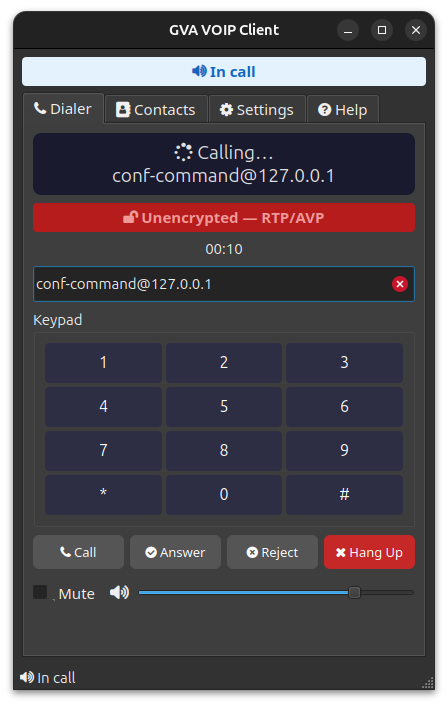
Dialer Tab
The main dialer tab allows direct SIP address entry and call control:
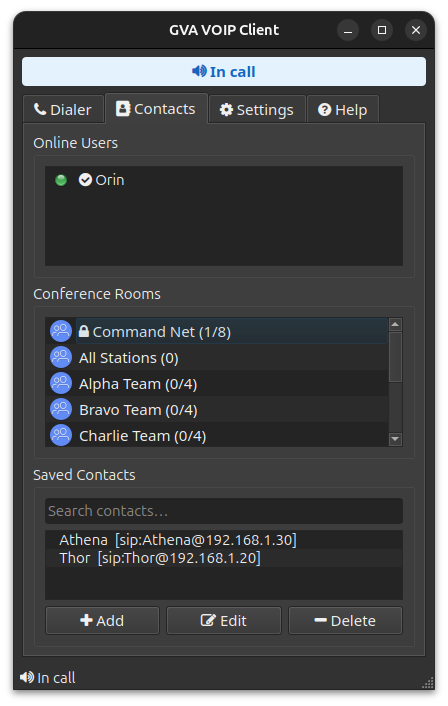
Contacts Tab
The contacts tab displays the address book for quick dialing:
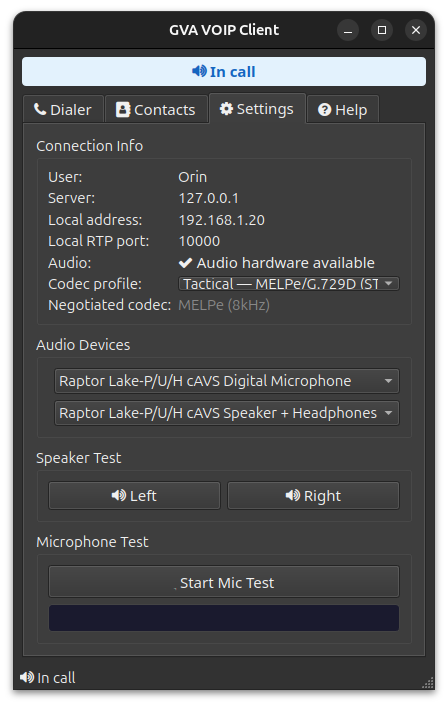
Settings Tab
Configure audio devices, codec profile, and connection settings:
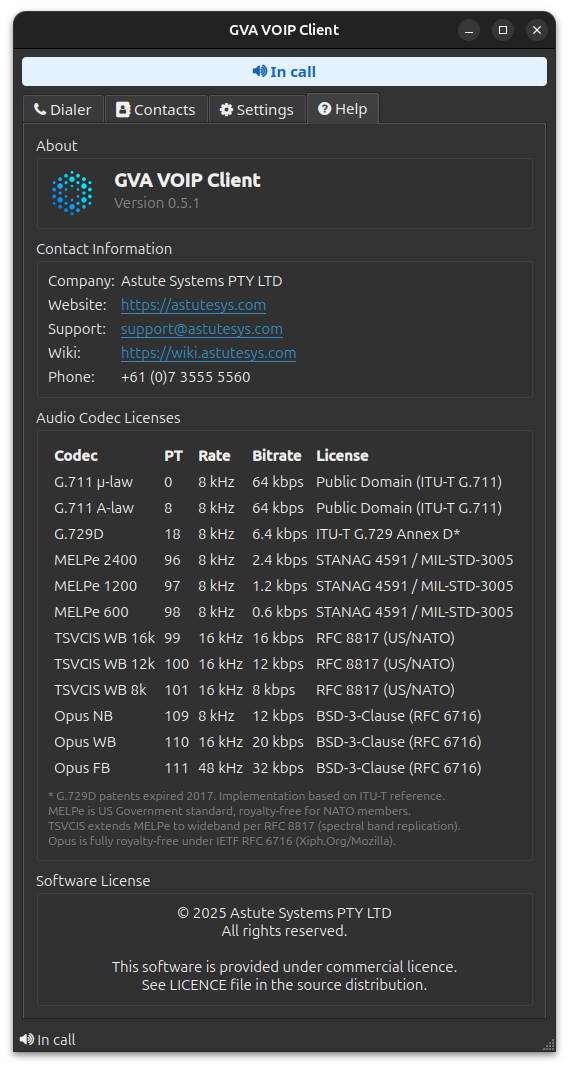
Help Tab
View codec information, keyboard shortcuts, and documentation:
Features
Audio Codecs
The client supports multiple codecs for different bandwidth scenarios:
| Codec | Bitrate | Quality | Use Case |
|---|---|---|---|
| G.711 | 64 kbps | Excellent | LAN, high bandwidth |
| G.729 | 8 kbps | Good | Limited bandwidth |
| MELPe | 2.4 kbps | Acceptable | Tactical radio links |
| Opus | Variable | Excellent | Modern networks |
SRTP Encryption
All RTP audio is encrypted by default using AES-256-CM with HMAC-SHA1-80 authentication (RFC 3711 / RFC 4568) suitable for OFFICIAL-SENSITIVE classification. Key exchange occurs during SIP INVITE via SDP crypto attributes.
Security
SRTP encryption is always enabled and cannot be disabled. This ensures all voice communications meet MoD OFFICIAL-SENSITIVE security baseline.
Address Book
The client can load contacts from a JSON address book:
Command Line Options
gva-voip-client [options]

SIP Options:
  -u, --user <username>      SIP username (e.g. alice)
  -s, --server <host>        SIP server host or IP
  -p, --port <port>          SIP server port (default: 5060)
  --local-port <port>        Local SIP listen port (default: 5061)
  --rtp-port <port>          Local RTP base port (default: 10000)
  -n, --display-name <name>  SIP display name

Codec Options:
  --codec-profile <profile>  SDP codec priority profile:
                             - tactical: MELPe NB, STANAG 4591
                             - wideband: TSVCIS WB+NB (RFC 8817)
                             - standard: Opus/G.711
                             Default: tactical
  --codecs                   Show available audio codecs and license info

Auto-Answer Options:
  --auto-answer              Automatically answer incoming calls (implies --headless)
  --play-wav <path>          WAV file to play when call is auto-answered
  --hangup-after <seconds>   Hang up after N seconds (0 = after WAV ends)

Other:
  --headless                 Run without GUI
  --address-book <path>      Path to address book JSON file
  -h, --help                 Show help
  -v, --version              Show version
Example Usage
Basic Registration
# Connect to local server
gva-voip-client \
    --user operator1 \
    --server 127.0.0.1

# Connect to remote server with display name
gva-voip-client \
    --user crew1 \
    --server voip.unit.mil \
    --display-name "Crew Station 1"
Secure Calling
# SRTP encryption is enabled by default (AES-256-CM)
gva-voip-client \
    --user secure1 \
    --server 127.0.0.1
Tactical Mode (Low Bandwidth)
# Use tactical codec profile (MELPe, STANAG 4591)
gva-voip-client \
    --user tac1 \
    --server 127.0.0.1 \
    --codec-profile tactical
Wideband Mode
# Use wideband codec profile (TSVCIS WB+NB)
gva-voip-client \
    --user wb1 \
    --server 127.0.0.1 \
    --codec-profile wideband
Auto-Answer (Intercom/Relay)
# Auto-answer and play a WAV file
gva-voip-client \
    --user intercom \
    --server 127.0.0.1 \
    --auto-answer \
    --play-wav /path/to/message.wav \
    --hangup-after 0

# Auto-answer, play message, then hang up after 30 seconds
gva-voip-client \
    --user relay \
    --server 127.0.0.1 \
    --auto-answer \
    --play-wav /path/to/greeting.wav \
    --hangup-after 30
Audio Device Selection
Audio devices are selected via the GUI or use system defaults in headless mode.
Common Device Names
| Type | Example Names |
|---|---|
| USB Headset | "USB Audio Device", "Jabra" |
| Built-in | "HDA Intel PCH", "Realtek" |
| Bluetooth | "WH-1000XM4", "AirPods" |
| HDMI | "HDMI Audio" |
Setting System Defaults
In headless mode, configure default audio devices via PulseAudio/PipeWire:
# List audio sinks (outputs)
pactl list short sinks

# List audio sources (inputs)
pactl list short sources

# Set default sink
pactl set-default-sink alsa_output.usb-0d8c_USB_Audio_Device-00.analog-stereo

# Set default source
pactl set-default-source alsa_input.usb-0d8c_USB_Audio_Device-00.mono-fallback
Keyboard Shortcuts
| Key | Action |
|---|---|
Enter |
Dial / Answer |
Escape |
Hang up |
M |
Mute/Unmute |
H |
Hold/Resume |
Ctrl+Q |
Quit |
Troubleshooting
No Audio
- Check audio device selection in the GUI
- Verify microphone permissions
- Test with
arecord -landaplay -l
Registration Failed
- Verify server address and port
- Check firewall (UDP 5060)
- Ensure username is unique
Poor Audio Quality
- Try a lower bandwidth codec (G.729 or MELPe)
- Check network latency with
ping - Verify QoS/DSCP marking is enabled on network
Echo/Feedback
- Use headphones instead of speakers
- Enable acoustic echo cancellation (AEC) if available
- Reduce speaker volume
Configuration Files
Address Book
The address book is a JSON file containing contacts. Pass it via --address-book:
{
  "contacts": [
    {
      "name": "Operator 2",
      "uri": "operator2@192.168.1.10"
    },
    {
      "name": "AI Agent",
      "uri": "agent@192.168.1.10"
    },
    {
      "name": "Command Post",
      "uri": "cmd@10.0.0.1"
    }
  ]
}
No Settings File
The VoIP client uses command-line options for all configuration. For persistent settings, create a shell alias or wrapper script:
See Also
- VoIP Client (GVA) — integrated HMI version
- VoIP Server
- VoIP Agent
- HERMES Overview