ATLAS - Adaptive Tactical Land Awareness Suite

ATLAS is the HMI and services suite of the GVA product line. At its core is the GVA HMI (gva-hmi) — a DEF STAN 23-009 compliant crew display that presents all eight GVA functional areas on a single screen, backed by DDS-based registration, alarm, and usage-monitoring services.
The Problem
Military vehicle programmes typically face fragmented, vendor-locked HMI solutions where every subsystem ships its own proprietary display software. Integrating cameras, weapons, BMS, and defensive aids onto a single crew station requires costly bespoke glue code, and adding a new subsystem means reworking the entire display stack. Crew training suffers because every platform looks and behaves differently.
How ATLAS Solves It
ATLAS provides a single, standards-based crew display that any GVA-compliant subsystem can plug into over DDS — no bespoke integration required. Third-party applications render directly into dedicated functional areas (WPN, STR, BMS) so new capabilities can be fielded without modifying the HMI itself. Standardised services for registration, alarms, and UACM run as independent processes, giving integrators a consistent, testable service layer across every platform.
Overview
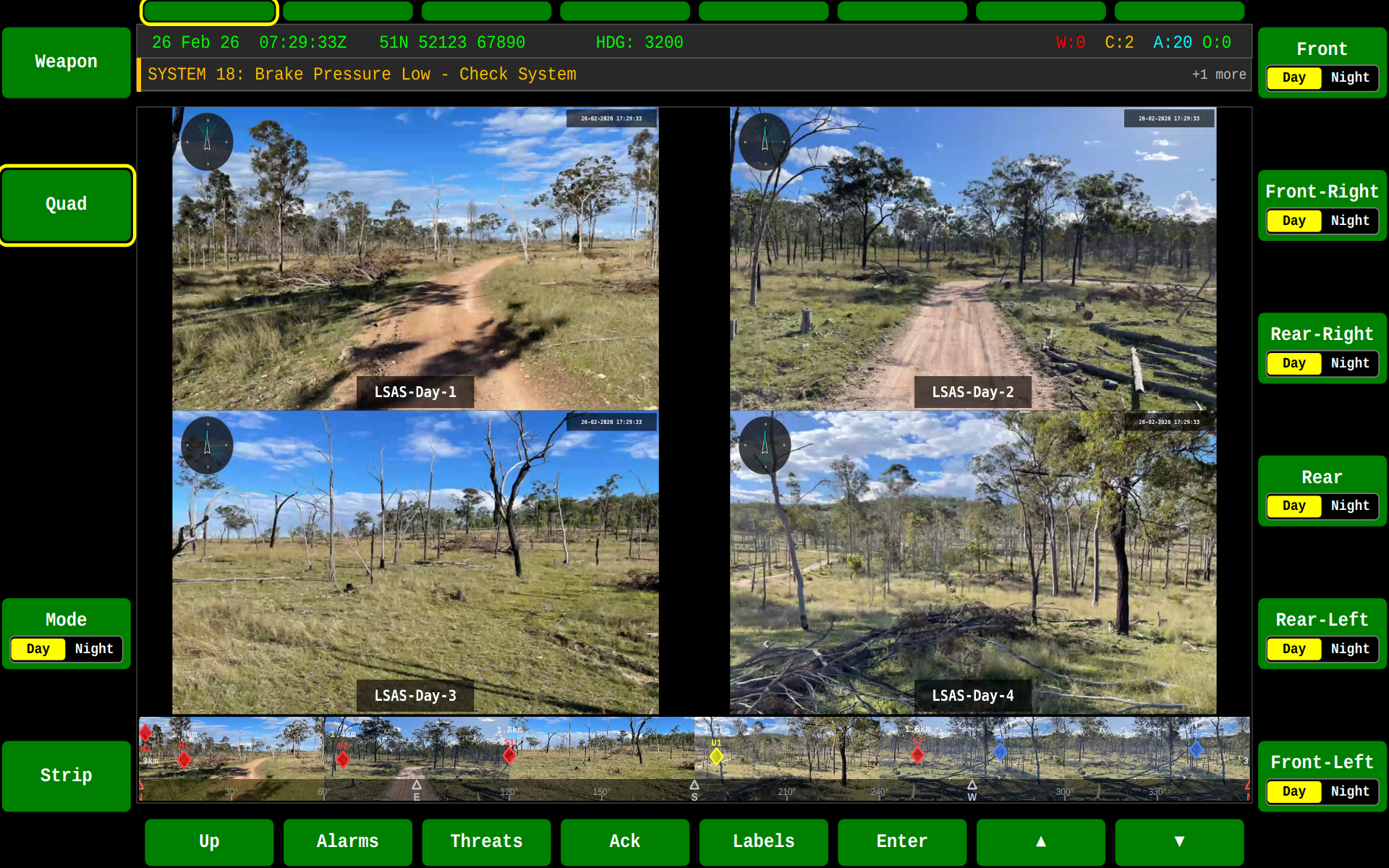
The ATLAS HMI application provides:
- DEF STAN 23-009 Compliance — Full implementation of the GVA display layout and all eight functional areas
- Plug-and-Play Subsystems — Third-party applications render to WPN, STR, and BMS screens over DDS without HMI changes
- Real-Time Services — Integrated registration, alarm annunciation, and UACM health monitoring
- Video & Sensor Fusion — Camera and video stream display on the SA (Situational Awareness) screen via MediaX
- Custom Widget Library — PPI, vehicle status, speedometer, threat display, and more — all dark-themed Qt6
QGraphicsItemwidgets - Multi-Language & Theming — Runtime language switching and day/night colour themes for operational flexibility
Functional Areas
The HMI implements all eight GVA functional areas accessible via the control buttons:
| Area | Key | Description |
|---|---|---|
| SA | F1 | Situational Awareness - Video/camera feed with PPI overlay |
| WPN | F2 | Weapons - Extensible screen for weapon systems |
| DEF | F3 | Defensive Aids - Countermeasures and threat display |
| SYS | F4 | System - 3D vehicle status and configuration |
| DRV | F5 | Driver - Speedometer, RPM, and camera feed |
| STR | F6 | Set To Role - Vehicle-specific role configuration |
| COM | F7 | Communications - Radio and comms management |
| BMS | F8 | Battlespace Management System - Tactical mapping and situational awareness |
Functional Area State Machine
All eight functional areas are fully interconnected — the crew can switch directly between any screen. Threats and Alarms overlays are accessible from any active screen.
Running the HMI
Basic Usage
gva-hmi is installed as part of the atlas product line (sudo apt install atlas) and is on $PATH:
# Start the HMI on default SA screen
gva-hmi

# Start on a specific functional area
gva-hmi --area=4    # Start on SYS screen
gva-hmi -a 5        # Start on DRV screen

# Play video on SA screen
gva-hmi /path/to/video.mp4
Command Line Options
| Option | Description |
|---|---|
-a, --area <N> |
Start in functional area (1=SA, 2=WPN, 3=DEF, 4=SYS, 5=DRV, 6=STR, 7=COM, 8=BMS) |
<video> |
Video file to play on SA screen (positional argument) |
-h, --help |
Display help information |
--version |
Display version information |
Keyboard Controls
Global Controls
| Key | Action |
|---|---|
F1-F8 |
Switch to functional area (SA, WPN, DEF, SYS, DRV, STR, COM, BMS) |
F11 |
Toggle fullscreen mode |
L |
Toggle label visibility |
Escape |
Exit fullscreen / Close alarms view |
Alarms View Controls
| Key | Action |
|---|---|
A |
Show/hide alarms table |
F1 |
Toggle sort by Time/Category |
F2 |
Toggle sort Ascending/Descending |
Up/Down |
Navigate alarm list |
Enter |
Acknowledge selected alarm |
DRV Screen Controls
| Key | Action |
|---|---|
F12 |
Toggle RPM gauge mode (Full/Compact) |
External Applications
The HMI supports third-party external applications on three extensible screens:
- WPN (F2) - Weapon system applications
- STR (F6) - Set To Role applications
- BMS (F8) - Battlespace management / mapping applications
When no external application is connected, these screens display "Waiting for External Application".
Running with BMS
# Terminal 1: Start the registry service
sudo systemctl start gva-registry.service

# Terminal 2: Start the HMI
gva-hmi --area=8

# Terminal 3: Start the BMS application
gva-app-bms --domain=0
See the TALOS documentation for more details.
Running with Shield Protocol
# Terminal 1: Start the registry service
sudo systemctl start gva-registry.service

# Terminal 2: Start the HMI on WPN screen
gva-hmi --area=2

# Terminal 3: Start the Shield Protocol game
gva-app-shield-protocol --domain=0
See the Shield Protocol documentation for more details.
DDS Integration
The HMI integrates with the GVA DDS services for:
- Alarms — Real-time alarm display with severity-based popup styles
- Registration — Auto-discovery via the GVA Registry Service
- Threats — Battlespace object tracking via the ThreatManager
- Display Extension — External application rendering via the External Apps Service
Architecture
┌─────────────────────────────────────────────────────────────┐
│                      GVA HMI Window                         │
├─────────────────────────────────────────────────────────────┤
│  ┌─────────────────────────────────────────────────────┐   │
│  │              Main Display Area                       │   │
│  │  ┌─────────────────────────────────────────────┐    │   │
│  │  │  Functional Area Content                     │    │   │
│  │  │  - SA: Video + PPI Widget                    │    │   │
│  │  │  - SYS: 3D Vehicle + Wheels Widget           │    │   │
│  │  │  - DRV: Camera + Speed/RPM Widgets           │    │   │
│  │  │  - BMS/WPN/STR: External App Frame           │    │   │
│  │  └─────────────────────────────────────────────┘    │   │
│  └─────────────────────────────────────────────────────┘   │
│  ┌─────────────────────────────────────────────────────┐   │
│  │  Status Bar: DTG | Grid Ref | Heading | Alarms      │   │
│  └─────────────────────────────────────────────────────┘   │
│  ┌─────────────────────────────────────────────────────┐   │
│  │  Function Keys (Bezel Buttons): F1-F20               │   │
│  └─────────────────────────────────────────────────────┘   │
└─────────────────────────────────────────────────────────────┘
The HMI ships as the pre-built gva-hmi binary in the atlas product line
(sudo apt install atlas). If you want to build your own external
application to run alongside it, see the SDK Reference.