Alarms
The GVA HMI displays real-time alarms from the GVA Alarms Service. Alarms are shown via popup indicators on the status bar and in a full-screen sortable table view.
Alarms Table View
Press F14 (Alarms) on any screen to display the full alarms table showing all active alarms, sorted by category and time:
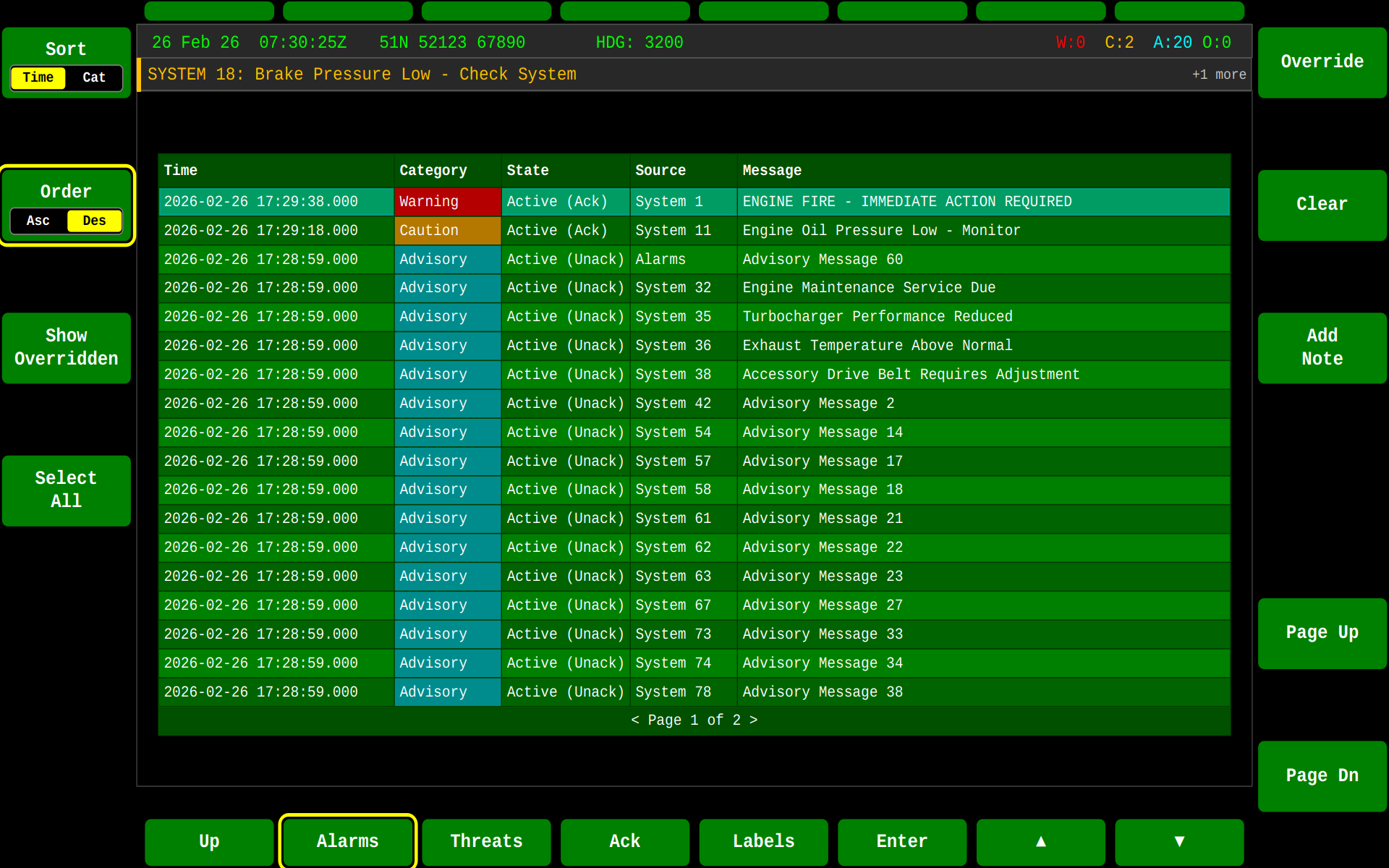
Table Columns
| Column | Description |
|---|---|
| Time | When the alarm was raised, shown as HH:mm:ss. Sorting uses the full timestamp (including date) even though the date isn't displayed, so ordering stays correct across day boundaries |
| Category | Warning, Caution, or Advisory (Def Stan 23-009 alarm category, colour-coded) |
| State | Unack, Ack, Resolved, or Cleared — with an (Ovrd) suffix when the underlying Alarm Condition is overridden |
| Source | The resource that raised the alarm, resolved from its registered platform identity (falls back to System <id> if the resource never completed registration) |
| Message | Human-readable alarm text (C_Alarm_Condition_Specification.A_alarmText) |
Table Controls
| Key | Action |
|---|---|
| F14 (Alarms) | Show/hide alarms table |
| F1 | Toggle sort by Time/Category |
| F2 | Toggle sort Ascending/Descending |
| F3 | Filter to show only overridden alarms |
| F7 | Override/unoverride selected Alarm Condition (Caution only) |
| F8 | Clear selected alarm |
| F9 | Add/edit annotation (on-screen keyboard) |
| F11 / F12 | Page up / down |
| F16 (Ack) | Acknowledge selected alarm |
| F18 (Enter) | Expand/collapse the selected row's annotation |
| F19 / F20 | Move selection ▲ / ▼ |
| F13 (Up) / F14 (Alarms) | Close alarms view |
| F15 (Threats) | Switch to Threats view |
Alarm Popups
Alarm notifications appear as colour-coded popups on the HMI status bar:
| Warning | Caution | Advisory |
|---|---|---|
 |
 |
 |
| Critical/Warning | Caution | Advisory |
| Immediate attention | Awareness needed | Informational |
When multiple alarms are queued, the display indicates pending items:

Severity Colour Coding
| Category | Colour | Description |
|---|---|---|
| Warning | Red (#B40000) |
Immediate action required — safety or mission critical |
| Caution | Amber (#B47800) |
Attention needed soon — degraded capability |
| Advisory | Teal (#008C8C) |
Information only — no immediate action needed |
Alarm Lifecycle
stateDiagram-v2
[*] --> Unack : Raised
Unack --> Ack : Operator acknowledges (F16)
Ack --> Resolved : Underlying Alarm Condition ends
Unack --> Resolved : Underlying Alarm Condition ends
Resolved --> [*] : Cleared (F8) — deleted from the Alarm Register
Unack --> Unack : Updated
Resolved --> Unack : Re-raised
- Raised — Source system detects a fault and publishes an Alarm Condition via DDS; the alarm appears Unacknowledged
- Ack — Operator presses F16 (Ack) on the selected alarm
- Resolved — Source system ends the underlying Alarm Condition
- Cleared — Operator presses F8; the alarm is deleted from the Alarm Register (GVA_ALM_80), not merely archived — see GVA Alarms Service
Alarms Overlay State Machine
The alarms overlay is accessible from any functional area via F14.
stateDiagram-v2
[*] --> AlarmsTable : F14 from any screen
state "Alarms Overlay" as AO {
state "AlarmsTable" as AlarmsTable {
SortTime : Sort by Time
SortCat : Sort by Category
SortTime --> SortCat : F1 Sort
SortCat --> SortTime : F1 Sort
OrderAsc : Ascending
OrderDesc : Descending
OrderAsc --> OrderDesc : F2 Order
OrderDesc --> OrderAsc : F2 Order
}
AlarmsTable --> NoteEntry : F9 Add Note
NoteEntry --> AlarmsTable : Confirm / Cancel
NoteEntry : On-Screen Keyboard
}
AO --> [*] : F13 Up / F14 Close
AO --> ThreatsOverlay : F15 Threats
Related
- GVA Alarms Service — Full alarms service documentation, DDS topics, and best practices
- Threats — Threat-related alarm notifications
- SYS — System diagnostics and fault codes